Hyperliquid · whales · stops · 2026Hyperliquid tools: whales, stops and liquidations on one chart
Updated November 9, 2026
On the evening of November 8, the largest Hyperliquid accounts were short bitcoin for $835M — almost twice as much as they were long. The crowd sat in longs: there were three times more such accounts. Below the price, at $75,050, $17M of stops and long liquidations were waiting. At 00:45 that night bitcoin fell 3% in fifteen minutes, and Hyperliquid took the largest share of the day's BTC liquidations. All of it was visible in advance. Hyperliquid is one of the few exchanges where positions, liquidations and even stop orders are open to everyone. Here is which tools help read them, how they differ, and where it all sits on one chart.
Key takeaways
- On Hyperliquid you can see what Binance, Bybit and OKX do not show: the largest positions, their liquidation prices, stop orders and take-profits.
- The most useful view is not a list of wallets but levels on the price chart: where stops and liquidations will fire and what balances them.
- A whale is context, not a reason to enter: it has a different account, different leverage and a different horizon.
- On Liqwall the Hyperliquid liquidation map for 61 markets and the whale tracker open with no sign-up, and the terminal adds the stops and take-profits of the whole exchange, walls with owners, TWAP orders and trading from the chart; for the first 3 days after sign-up all of it is free.
- HyperTracker is strong at tracking wallets, Hyperdash is a terminal for Hyperliquid itself, Hypurrscan and ASXN are an explorer and statistics dashboards.
What you can see on Hyperliquid
In the Liqwall terminal each layer of Hyperliquid is a separate indicator on the price chart.
- Hyperliquid Liquidation Map — the prices where open positions get liquidated. Available for 61 markets, including stocks, gold and oil.
- Hyperliquid Trigger Map — where the stop orders and take-profits of all accounts fire. Stops and liquidations push the price further; take-profits slow it down.
- Hyperliquid Whales — the largest positions right on the chart: side, size, leverage, entry, liquidation price, stop and take-profit.
- Hyperliquid Walls — the largest orders in the book: how big they are, how long they rest and what position the account behind them holds.
- Hyperliquid Whale Moves and Whale Trades — when the largest accounts add to or cut their positions, and where large market orders went through.
- Hyperliquid TWAP — how much the running TWAP orders will buy or sell in the next hour.
- Hyperliquid Entry Map and Who's Trapped — where longs and shorts were opened and whose positions hurt more than usual right now.
- Hyperliquid Levels — at each price: what pushes the price on (liquidations and stops) and what holds it (book orders and take-profits).
A live example: whales short, the crowd long
On the evening of November 8 the largest bitcoin position on Hyperliquid was a $179M short at 5x from $76,390. Its liquidation sat at $131,000 — very far away — and it had no stop and no take-profit. Next to it, a $70M short at 13x from $75,983, also without a stop.
Among the 25 largest BTC positions, shorts totalled $835M and longs $431M. By the number of accounts the picture was the opposite: 30,661 accounts long, 11,961 short. Big money bet on a drop; the crowd bet on a rise.
That is not yet a reason to short after the whale. But it raises a question: where are the crowd's long stops and liquidations, and what happens if the price gets there?
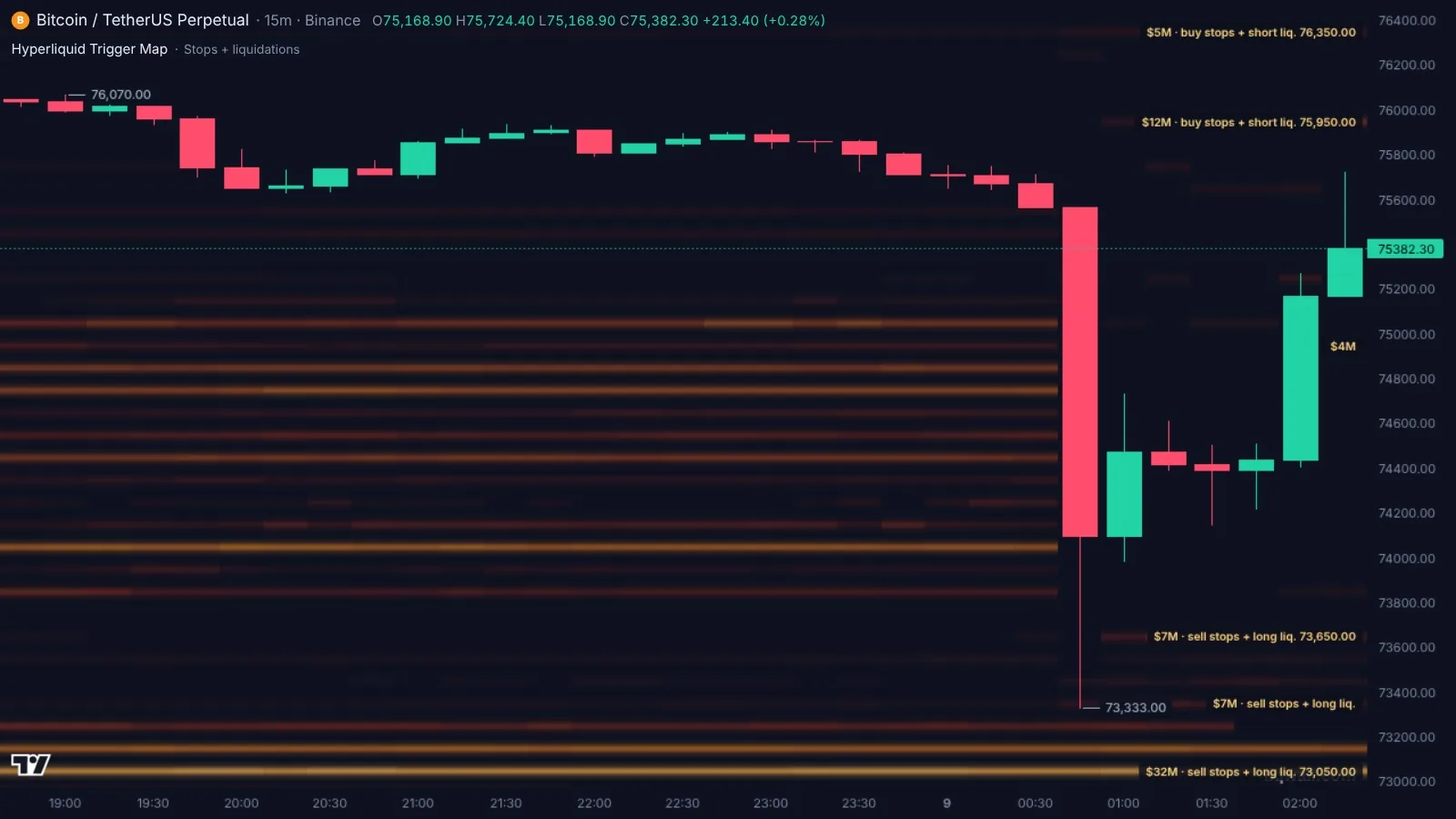
The answer is on the stop map. That evening, below the price stood sell stops and long liquidations: $17M at $75,050 and another $17M at $74,750, with a dense row of bands further down to $73,900. Above the price there was almost no such fuel: about $4M at $76,350.
What happened next
At 00:45 Moscow time sellers broke $75,000. The stops fired, liquidations added selling, and in one 15-minute candle bitcoin fell from $75,565 to $73,333. The bands below the price went out on the map — those orders were filled.
Over the day, $260M of BTC positions were liquidated, and the most on Hyperliquid: $109M, 42% of all bitcoin liquidations.
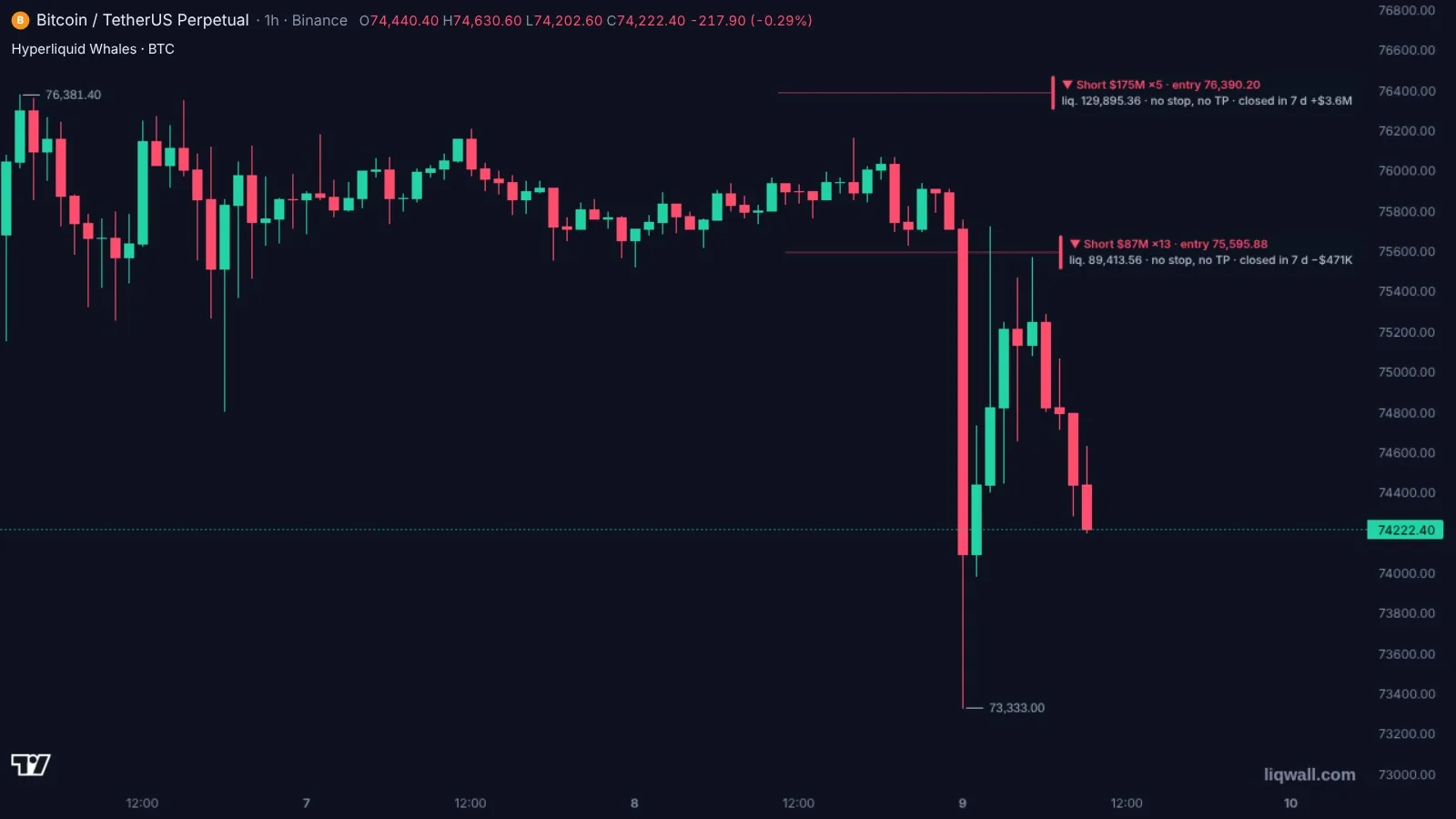
In the morning the whale had not closed its short: the position from $76,390 was still open and in profit, and the second short had grown to $87M with an average entry of $75,596.
The stop map did not say the price would go down. It said something else: if it goes, it will speed up, because there is fuel below the price and none above. The direction was read from the order book and the trades; Hyperliquid showed what it would turn into.
Breakdowns like this for BTC, ETH and SOL come out in the channel every day, free (in Russian).
How traders use Hyperliquid data
- Where not to stand. Keep your own stop outside the bright bands of the stop map: the crowd's stops stand there, and the price is carried through them all at once.
- Where to take profit. Dense liquidation bands in the direction of the trade are where the move speeds up and where it is convenient to close part of the position.
- What holds the price. Take-profits and large book orders slow a move down. Hyperliquid Levels shows them next to the fuel at each price.
- Whom to watch. Hyperliquid Whale Moves shows when the largest accounts add to or cut their positions. That is context: a whale can hold for weeks and sit through a move that knocks you out.
- What to expect in the next hour. Hyperliquid TWAP shows how much the running long orders will buy or sell.
The best Hyperliquid tools in 2026: comparison
| Tool | What it gives | Without paying | Full access | Russian |
|---|---|---|---|---|
| Liqwall | Liquidation map for 61 markets (crypto, stocks, gold, oil); whales with stops and take-profits; a stop and take-profit map of the whole exchange; walls with owners; whale moves; TWAP; trading from the chart; order books and liquidations of other exchanges next to them | Liquidation map and whale tracker — right away, no sign-up | The whole terminal — 3 days free right after sign-up | Yes |
| HyperTracker | Wallet tracking, whales, account cohorts, leaderboard, alerts, liquidation heatmap | Dashboard with no sign-up | API — from $179 a month | Landing page English only |
| Hyperdash | Hyperliquid terminal and analytics: liquidation and stop heatmaps, top traders, copy trading | Analytics and trading with no subscription | Data API — $500 a month | Yes |
| CoinGlass | Hyperliquid whale tracker and liquidation map | Hyperliquid pages with no subscription | Prime — $28 a month | Yes |
| Hypurrscan | Hyperliquid explorer: addresses, trades, TWAP, leaderboard | Free | — | No |
| ASXN Hyperscreener | Hyperliquid dashboards: markets, top traders, liquidations, TWAP | No login | — | No |
Prices and terms — from the services' official pages as of November 8, 2026.
Liqwall puts everything about Hyperliquid on the price chart rather than in a wallet table: liquidations, stops, take-profits, whales and walls next to the candles. The liquidation map for 61 markets and the whale tracker open right away, with no sign-up. Next to them — the order books and liquidations of Binance, Bybit, OKX and other exchanges, maps for stocks, gold and oil, Telegram alerts and trading from the same screen with the stop on the exchange itself. In English and Russian. For the first 3 days after sign-up the whole terminal is free.
HyperTracker follows specific wallets; it shows Hyperliquid apart from the rest of the market, its landing page is English only, and data for your own code starts at $179 a month.
Hyperdash is a terminal for Hyperliquid itself: no order books, liquidations or stops of other exchanges next to it; data for your own code is $500 a month.
CoinGlass has a Hyperliquid whale tracker and liquidation map as separate pages; the extended heatmap is in Prime for $28 a month.
Hypurrscan and ASXN Hyperscreener are an explorer and statistics dashboards, not trading tools; the interface is English only.
Common mistakes
- Copying a whale's trade. It may have a hedge on another exchange, a huge margin buffer and a horizon of months.
- Looking only at liquidations. A trader's stop usually sits closer to the price than their liquidation, so stops fire first.
- Forgetting take-profits. Dense take-profits above the price slow a rise just like a wall in the order book.
- Taking Hyperliquid for the whole market. It is one exchange. Check its map against the liquidation map of all exchanges — that evening they showed different things.
- Looking at yesterday's snapshot. Positions open and close every minute. You need a fresh map.
Hyperliquid in Liqwall: open it in a minute
- Open the Hyperliquid liquidation map — it works with no sign-up, for BTC, ETH, SOL, HYPE and 57 more markets, including stocks, gold and oil.
- See the largest positions in the Hyperliquid whale tracker — free, no sign-up.
- Open the terminal and add indicators from the Hyperliquid section: Liquidation Map, Trigger Map, Whales, Walls.
- Set an alert on a level or on a Hyperliquid event: a new wall, a large market order, a change of a big position. The message comes to Telegram or the phone.
- Want to trade from the same chart — connect a Hyperliquid wallet opened through Liqwall's link (code LIQWALL). It connects with a wallet signature, orders go straight to the exchange, the stop rests on the exchange itself, and the money stays with you.
For the first 3 days after sign-up all of Liqwall is free: whales, stops, walls, TWAP and every Hyperliquid indicator — live.
Every day in the Liqwall | Trading Terminal channel — Hyperliquid whales, their liquidation prices and what happens if the price gets there. Free, in Russian.
SubscribeHyperliquid liquidations, stops and whales on one chart — and trading from the same screen.
Questions and answers
What tools do I need to trade on Hyperliquid?
A liquidation map, a stop and take-profit map, a tracker of the largest positions and an order book with walls. On Liqwall they all sit on one price chart, and you can trade from the same screen.
Where can I see a free Hyperliquid liquidation map?
On Liqwall: the Hyperliquid liquidation map for 61 markets opens with no sign-up and updates by itself. In the terminal it is live.
How do I track Hyperliquid whales?
Open the Hyperliquid whale tracker on Liqwall: the largest positions with side, size, leverage, entry and liquidation price — free, with no sign-up. In the terminal, Hyperliquid Whales shows them live right on the chart, together with their stops and take-profits.
Where can I see stop orders on Hyperliquid?
In the Liqwall terminal, the Hyperliquid Trigger Map indicator: it shows the prices where the stops and take-profits of all accounts fire. Free for the first 3 days after sign-up.
Should I copy whale trades?
Better not. A whale has a different account size, a different margin buffer and a different trade horizon. Use its position as context: where its liquidation is, whether it has a stop and what happens to the price if it starts closing.
Does Hyperliquid have stocks, gold and oil?
Yes, as perpetual contracts. On Liqwall there is a liquidation map for them too: indices, large stocks, gold, silver and oil.
Can I trade Hyperliquid through Liqwall?
Yes. A Hyperliquid wallet opened through Liqwall's link (code LIQWALL) connects with a wallet signature. Orders go straight to the exchange, and the stop rests on the exchange itself.
Do I need to move money to Liqwall?
No. The money stays on your Hyperliquid account. Liqwall does not hold it.
Are there Hyperliquid tools in Russian?
Yes. The Liqwall terminal and all its open pages are in English and Russian.