Order book · walls · 2026Order book heatmap: how to read walls and where to see the order book of all exchanges
Updated November 9, 2026
A $40M wall in the order book can stop bitcoin — or vanish a second before the price reaches it. A regular order book shows only this second. A heatmap shows what came before it: which wall has stood for hours, which was placed a minute ago, which was eaten and which was quietly pulled. Here is how to read it on a live example, how Bookmap, Exocharts and other tools differ, and where to see the order book of all exchanges right in the browser.
Key takeaways
- An order book heatmap — also called a liquidity heatmap — shows where large buy and sell orders rest, by price and over time.
- A band that ends before the price arrives is a pulled order. A band that ended under trades was eaten.
- A large wall does not hold the price by itself. What matters is what happens to it when the price comes.
- One exchange's order book is half the picture: large orders rest on different exchanges.
- On Liqwall the order book heatmaps for BTC, ETH, SOL and HYPE open with no sign-up, and the terminal shows the books of Binance, Coinbase, Hyperliquid and all exchanges together; for the first 3 days after sign-up the whole terminal is free. Bookmap is a desktop program with plans from $49; TradingLite shut down in 2026.
What an order book heatmap shows
Time runs left to right, price bottom to top, and colour shows how much money rests in the book at each price. Buy orders below the price, sell orders above it. The brighter the band, the more money at that level.
A regular order book is a photo. A heatmap is a film: you see which orders rested for hours, which appeared just before the price came, and where they went afterwards. That is what tells a real wall from a painted one.
A live example: two walls and one reversal
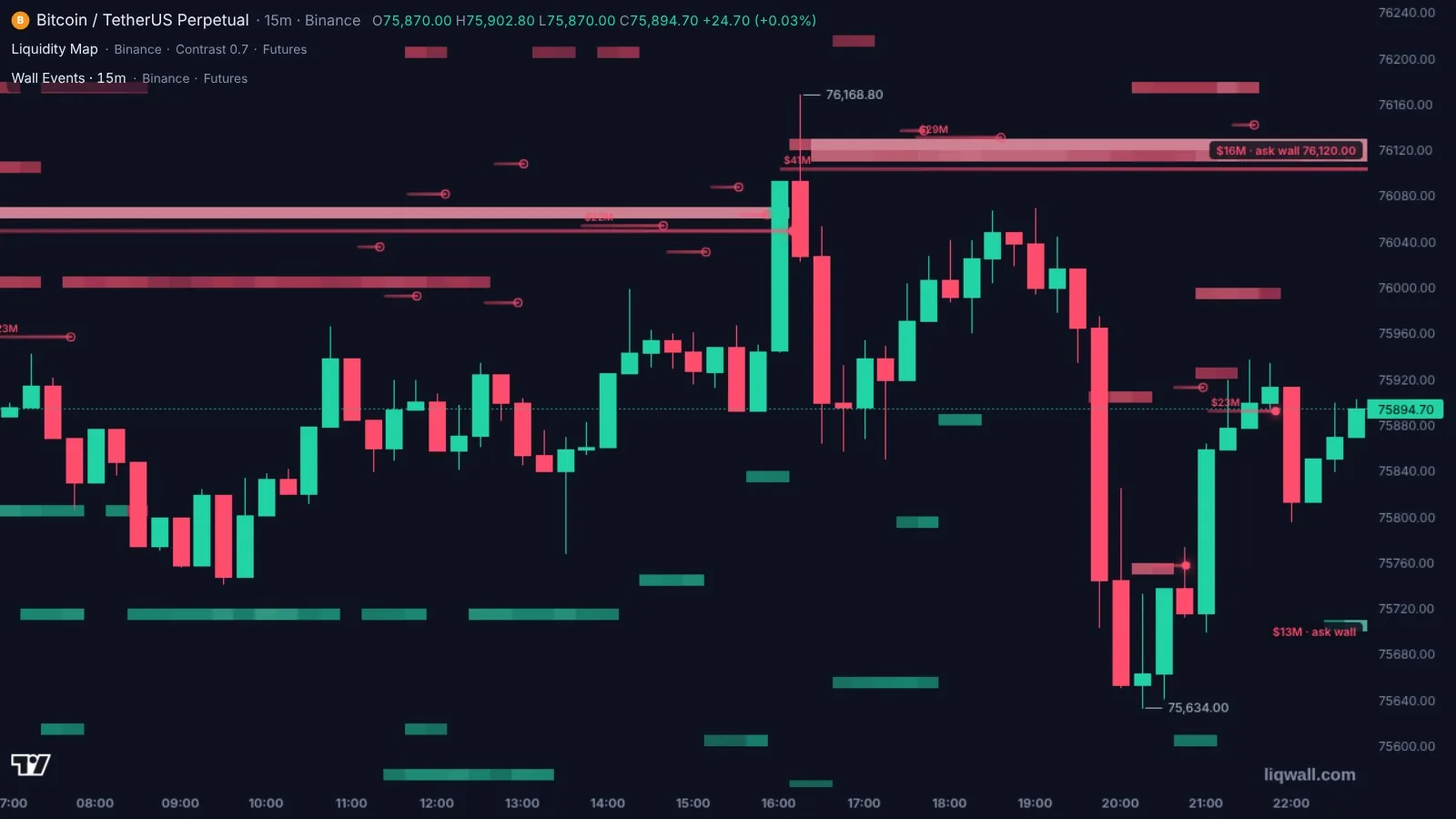
On the morning of November 8 a sell wall of about $22M stood at $76,050. All day the price shuffled below it.
Around 16:00 Moscow time buyers ate it: the candle shot up, and the wall's line ended with a bright dot. But just $60 higher a bigger wall was already waiting — about $41M at $76,110. The price pierced it with a wick to $76,168 and could not hold.
The wall stayed. By the evening bitcoin slid to $75,634, where a buy wall at $75,700 met it from below.
What this tells you:
- An eaten wall shows buyer strength, but it is not a reason to buy at once. The next wall may be bigger, as it was here.
- A wall that survived the touch is resistance while it stands. As long as its line runs to the right, the seller is there.
- Pulled orders are a reason to look closer. Hollow circles at the ends of short lines are orders removed before the price came. That day there were about ten of them above the price: someone was showing a sale but had no intention to sell.
How to read walls: five rules
- Look at age. A wall that has stood for hours weighs more than one that appeared a minute ago.
- Watch the approach. If a wall is pulled as the price comes near, it held nothing. After that the price often passes the level fast.
- Look for absorption. The price sits at the wall, trades go through, and the wall does not shrink — the other side is being absorbed. That is a sign of a real buyer or seller.
- Check against liquidations. A wall in front of a liquidation cluster can keep the price away from it. An eaten wall opens the road to the fuel. More in the guide to the liquidation map.
- Look at all exchanges. A wall on one exchange can be balanced by an opposite one on another.
The order book heatmap opens right away — no sign-up.
One exchange or all of them
Large bitcoin orders rest on Binance, Coinbase, Hyperliquid and a dozen other exchanges. It is easy to take one exchange's book for the whole market — and be wrong.
In the Liqwall terminal the order book heatmap — the Liquidity Map indicator — opens for Binance, for Coinbase, for both together, for Hyperliquid or for all exchanges at once. And the order book of all exchanges stacks the orders into one ladder by price: you see how much money stands at each level of the whole market and which exchange holds it.
On Hyperliquid you see even more — the owner of the wall. The Hyperliquid Walls indicator shows the largest orders, how long they have rested and what position the account behind them holds. A sell wall held by an account with a huge short is not the same as a wall from a random seller.
The best order book heatmaps in 2026: comparison
| Tool | What it gives | Without paying | Full access | Russian |
|---|---|---|---|---|
| Liqwall | Order book heatmap in the browser and on the phone; Liquidity Map for Binance, Coinbase, Hyperliquid and all exchanges together; eaten and pulled walls; Hyperliquid walls with their owners; liquidations, stops and trades next to them | Order book heatmaps for BTC, ETH, SOL and HYPE — right away, no sign-up | The whole terminal — 3 days free right after sign-up | Yes |
| Bookmap | Order book heatmap; desktop program and a web version | Digital plan | Global — $49 a month, Global Plus — $99, Global Premium — $199 | Website — yes |
| Exocharts | Footprint, price ladder, volume profile; no order book heatmap on their features page | Web version a day late | Web — €28 a month, desktop — €49 | No |
| CoinAnk | Liquidity heatmap | Charts do not open without login | VIP — $20 a month | Yes |
| TensorCharts | Order book heatmap in the browser; the website did not open on November 8, 2026 | — | — | — |
| TradingLite | The service shut down in 2026 | — | — | — |
Prices and terms — from the services' official pages as of November 8, 2026.
Liqwall — an order book heatmap right in the browser and on the phone, with nothing to install and nothing to pay: the BTC, ETH, SOL and HYPE maps open at once, with two days of history. In the terminal you can see the book of Binance, Coinbase, Hyperliquid or all exchanges together, see which walls were eaten and which were pulled, and find the owners of walls on Hyperliquid. Next to the walls — liquidation levels, Hyperliquid stops and whales, Telegram alerts and trading from the same chart. For the first 3 days after sign-up the whole terminal is free.
Bookmap is first of all a desktop program, and its paid plans run from $49 to $199 a month.
Exocharts — no order book heatmap on its features page, without sign-up the data is a day late, the interface is English only; paid from €28 a month.
CoinAnk — charts do not open without login; full access is in VIP for $20 a month.
TensorCharts and TradingLite — TradingLite shut down in 2026, and the TensorCharts website did not open on November 8. If you were looking for a replacement — here it is.
Why the order book alone is not enough
The order book shows who stands in the way. It does not show who is hitting, or what happens behind the wall.
- Trades. An eaten wall means market buys or sells. The CVD and Volume Footprint indicators show who hit and at which prices.
- Liquidations. Behind an eaten wall there is often a liquidation cluster. Then the move speeds up: that is what happened on the night of November 9, when bitcoin fell from $75,565 to $73,333 in fifteen minutes.
- Hyperliquid stops. The crowd's stops work as invisible market orders. On Liqwall you see them on the stop map next to the order book.
In the Liqwall terminal all these layers sit on one chart.
Common mistakes
- Taking a large order for a wall that will surely hold the price.
- Looking at one exchange's book and taking it for the whole market.
- Not noticing that the wall was pulled — and trading off a level that is no longer there.
- Buying right after an eaten wall without checking what stands above.
- Placing a stop right behind a wall: that is where everyone places it.
The order book heatmap in Liqwall: open it in a minute
- Open the BTC order book heatmap — it works with no sign-up, keeps two days of history and updates by itself. ETH, SOL and HYPE have the same maps.
- Above the map the key numbers are written as text: how much money stands within 2% of the price and where the largest levels are.
- Want the order book on your own chart — open the terminal and add Liquidity Map and Wall Events. Pick an exchange or “All exchanges”.
- For Hyperliquid add Hyperliquid Walls: click a wall to open a card with its owner and their position.
For the first 3 days after sign-up all of Liqwall is free: Liquidity Map, walls, the order book of all exchanges and Hyperliquid data — live.
Every day in the Liqwall | Trading Terminal channel — which walls hold BTC, ETH and SOL, who places them and what lies behind them. Free, in Russian.
SubscribeWalls, liquidations and trades on one chart — in the browser.
Questions and answers
What is an order book heatmap?
A chart where colour shows how much money rests in the order book at each price and how it changed over time. Bright bands are large buy orders below the price and sell orders above it.
What is the difference between an order book heatmap and a liquidity heatmap?
No difference — they are two names for the same thing. In the Liqwall terminal it is called the Liquidity Map; on the open pages, the order book heatmap.
How can I tell a wall was pulled?
Its band ends before the price reaches it. The Wall Events indicator marks such a wall with a hollow circle, and one eaten by trades with a bright dot.
Can I trust large walls?
Only those that stand for a long time and do not vanish as the price comes. A large order can be placed to be seen and pulled before the touch. The heatmap shows exactly which walls do that.
Where can I see the order book of all exchanges at once?
In the Liqwall terminal: the Liquidity Map set to “All exchanges” shows the heatmap for the whole market, and the order book of all exchanges stacks the orders into one ladder by price.
How is Liqwall different from Bookmap?
Bookmap is first of all a desktop program with paid plans from $49 a month. Liqwall runs right in the browser and on the phone, with nothing to install, and next to the walls it shows liquidation levels, Hyperliquid stops and whales and the owners of walls. You can trade from the same chart.
Is there a free order book heatmap?
Yes. On Liqwall the order book heatmaps for BTC, ETH, SOL and HYPE open free and with no sign-up, with two days of history. And for the first 3 days after sign-up the whole terminal is free.
Does the order book heatmap work on a phone?
Yes. Liqwall runs in the browser and installs on a phone as an app — no app store needed.
How does an order book heatmap help in trading?
It shows where the big players stand and what they do as the price comes: hold the level, give it up or pull their orders. That tells you where the price may be stopped and where the road is clear.