Crypto terminal · all-exchange order book · 2026A crypto trading terminal with the order book of all exchanges: what to choose in 2026
Updated November 9, 2026
On the night of November 9, a trader watching the Binance order book saw buyers arriving below the bitcoin price: in ten minutes, buy orders there grew by $43M. Across the whole market, in the same minutes, they shrank — on the other exchanges, buy orders below the price fell by $85M. At 00:55 the support was gone, and in five minutes bitcoin fell to $73,333. One exchange's order book is less than half the market. Here is which terminal shows the order book of all exchanges, what else it needs, and how Tiger Trade, Vataga, MetaScalp, Bookmap and TradingView differ.
Key takeaways
- A crypto terminal is the chart, the order book and trading on one screen. A good terminal shows not just its own exchange but the whole market.
- One exchange's order book is less than half the picture: on November 8, Binance held only 38% of the bitcoin futures orders within 1% of the price, and 16% on spot.
- Walls in the order book get placed and pulled. What matters is not only how much stands, but what happens to the orders when the price comes.
- Besides the order book, a terminal needs liquidations, the crowd's stops, alerts and a stop on the exchange itself — otherwise you watch the market in five tabs.
- On Liqwall the order book heatmaps and liquidation maps open with no sign-up, and the terminal adds the order book of all exchanges, walls, liquidations, Hyperliquid stops and whales and trading from the chart; for the first 3 days after sign-up the whole terminal is free. Bookmap is a desktop program from $49 a month, TradingView has neither an all-exchange order book nor liquidation maps, and Tiger Trade, Vataga and MetaScalp show no combined order book of exchanges on their pages.
What a crypto terminal is and why it needs the order book of all exchanges
A crypto terminal is a program or a website with the price chart, the order book and an order ticket on one screen. You do not jump between exchange tabs: you see the market and place the order right away.
The order book is the buy and sell orders by price. But bitcoin trades on Binance, Coinbase, Hyperliquid, Kraken, Gate and a dozen other exchanges, and each has its own book. The order book of all exchanges stacks their orders into one ladder by price: you see how much money stands at each level of the whole market and which exchange holds it.
One evening shows why this matters. On November 8 at 23:00 Moscow time, $706M of buy orders stood within 1% below the price on bitcoin futures across all exchanges. Binance held $271M of them — 38%. On spot the gap is even wider: $123M across all exchanges and $20M on Binance.
A live example: Binance showed support, the market did not
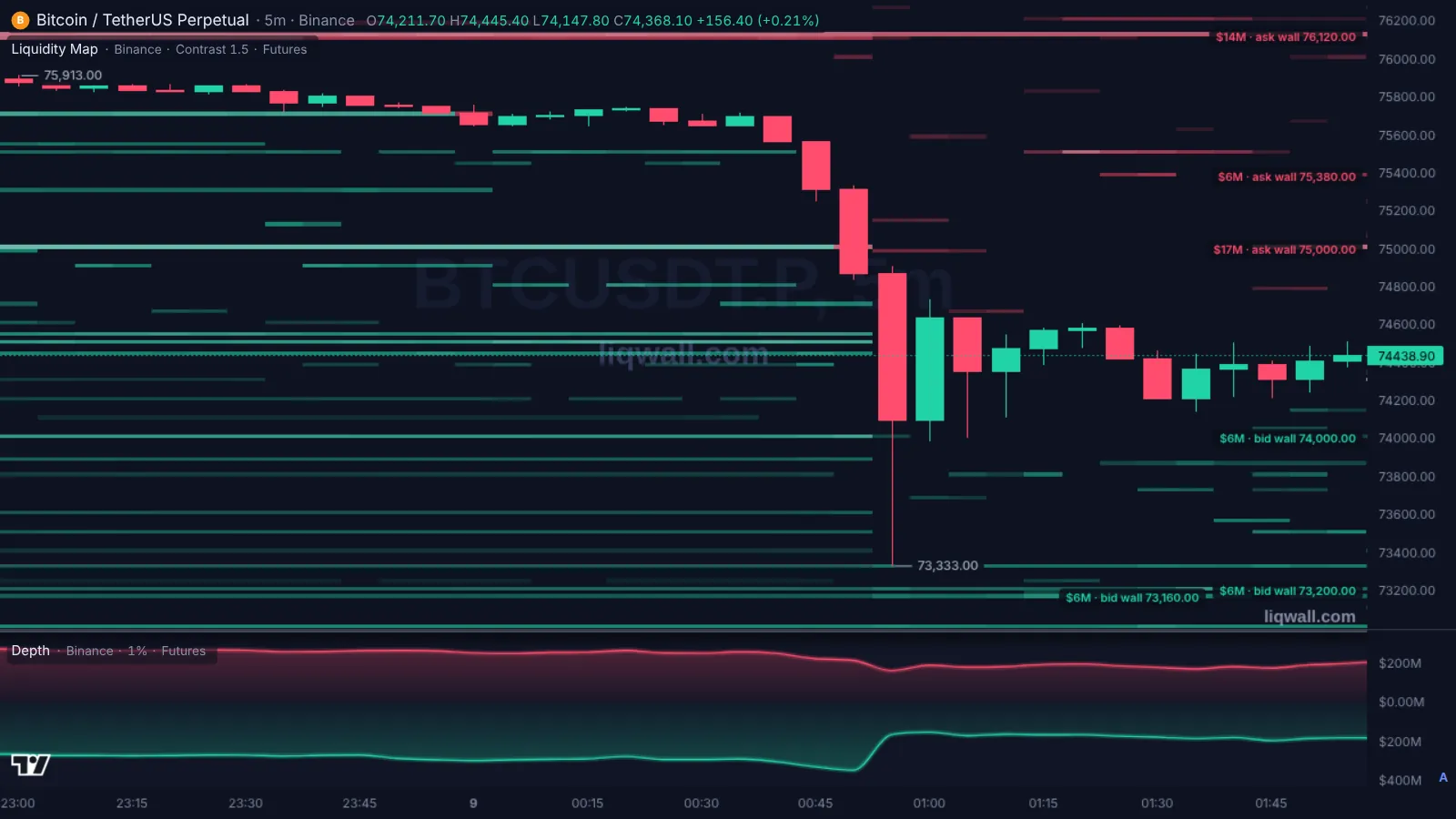
At 00:40 Moscow time bitcoin stood at $75,700. Here is what the futures order book held within 1% below the price:
- on Binance, buy orders grew in ten minutes — from $306M to $349M;
- across all exchanges, in the same minutes, they shrank — from $749M to $707M;
- so on the other exchanges, buy orders below the price fell from $443M to $358M.
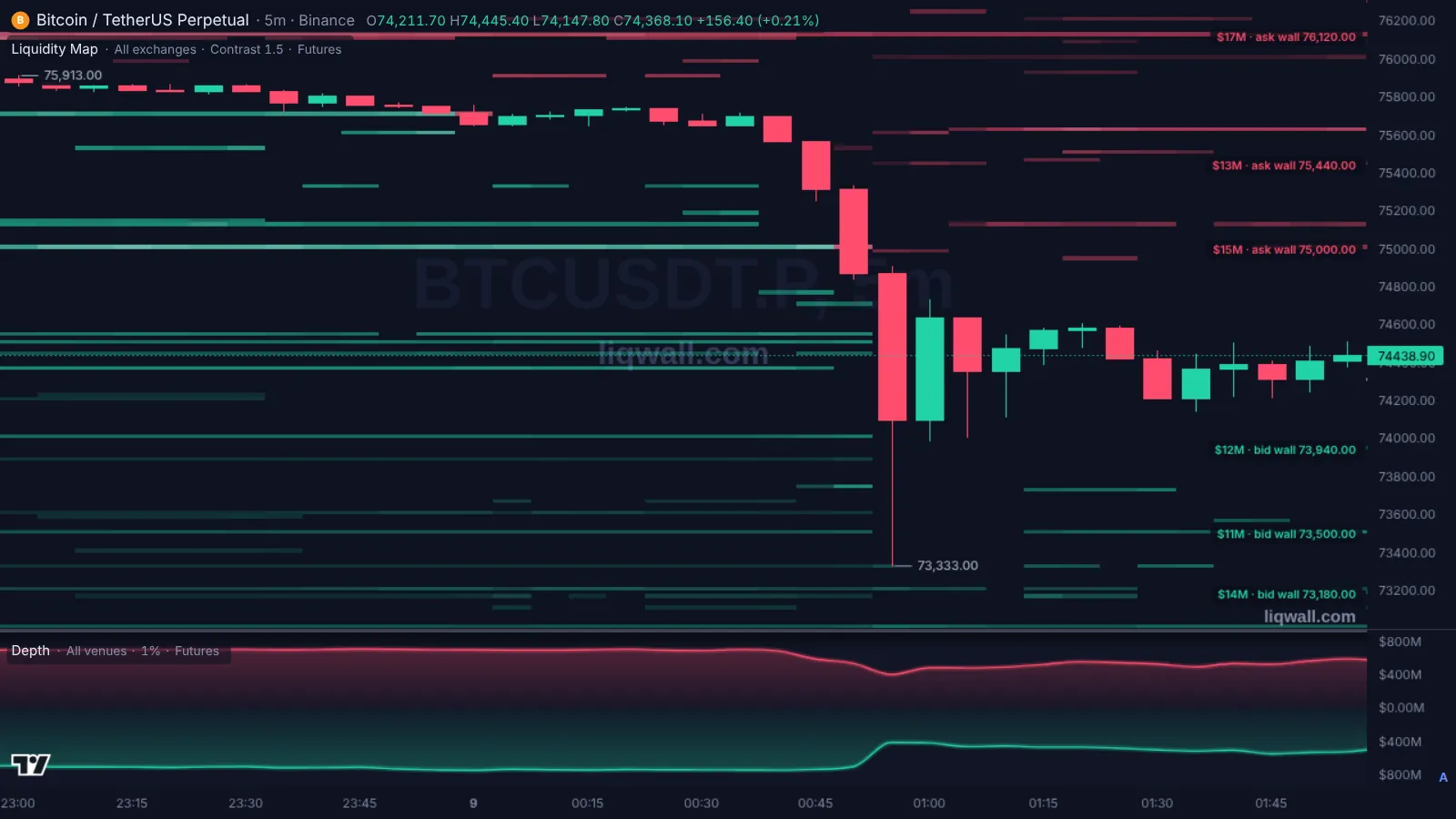
At 00:55 the support was gone. Buy orders within 1% below the price across all exchanges fell to $414M from $707M five minutes earlier, and in one 5-minute candle bitcoin fell from $74,870 to $73,333. Binance futures turnover in those five minutes was $1.3B.
Anyone watching only Binance saw buyers arriving and could buy “off the support”. The order book of all exchanges showed something else: the market below the price was thinning, and there was no support.
The order book of all exchanges — for bitcoin and other coins, in the browser.
How to choose a crypto terminal: six questions
- Do you see the whole market? The order book of all exchanges and an order book heatmap for all exchanges, not just one.
- Do you see what walls do? An order is placed and pulled in a second. A terminal should mark which wall was eaten by trades and which was pulled before the price came.
- Are there liquidations and stops? Clusters of liquidations and stop orders speed a move up. Without them you see the orders but not the fuel behind them.
- Where does your stop rest? The stop should rest on the exchange itself, not in a program on your computer: the power or the internet goes off — the stop still works.
- Does it need installing? A Windows program will not open on your phone on the road. A terminal in the browser opens anywhere.
- Will the message come? An alert on a price or on an order book event should reach Telegram or your phone, so you do not have to sit at the screen.
The order book heatmap opens right away — no sign-up.
The best crypto terminals with an order book in 2026: comparison
| Tool | What it gives | Without paying | Full access | Russian |
|---|---|---|---|---|
| Liqwall | Terminal in the browser and on the phone: the order book of all exchanges in one ladder; an order book heatmap for Binance, Coinbase, Hyperliquid and all exchanges together; eaten and pulled walls; liquidation maps; Hyperliquid stops and whales; Telegram alerts; trading from the chart with the stop on the exchange | The terminal chart, order book heatmaps and liquidation maps — right away, no sign-up | The whole terminal — 3 days free right after sign-up | Yes |
| Tiger Trade | Windows and macOS program and a web terminal: order book, clusters, trades; crypto and stocks | Crypto license — only for clients of their broker | Stocks and all markets — paid licenses | Yes |
| Vataga | Windows and macOS program, web and phone: exchange order books in tabs, TradingView charts | The terminal is free | — | Yes |
| MetaScalp | Windows-only program in alpha testing: order book, trades, clusters | The terminal is free | — | Yes |
| Bookmap | Order book heatmap; desktop program | Digital — one instrument, one hour of crypto history | Global — $49 a month, Global Plus — $99, Global Premium — $199 | Website — yes |
| TradingView | Charts and indicators; no all-exchange order book and no liquidation maps | Basic — 2 indicators per chart, 3 price alerts | Essential — from $12.95 a month, Premium — from $59.95 (billed yearly) | Yes |
| Altrady | Web terminal and bots for several exchanges; not a word about liquidations on its pricing page | 5-day trial | Basic — €28 a month (3 exchanges), Essential — €50 (5 exchanges), Premium — €90 | Website — yes |
Prices and terms — from the services' official pages as of November 9, 2026.
Liqwall is a terminal right in the browser and on the phone, with nothing to install. The order book of all exchanges stacks the orders of Binance, Coinbase, Hyperliquid, Kraken, Gate and other exchanges into one ladder, and the order book heatmap shows them for Binance, Coinbase, Hyperliquid or all exchanges together — with eaten and pulled walls. On the same chart — liquidation maps, Hyperliquid stops, take-profits and largest positions, 75 technical indicators and 89 drawing tools. Alerts come to Telegram, the phone or email. You can trade from the same chart on Hyperliquid, BingX and Gate and on Upscale prop accounts: partial take-profits, breakeven and trailing, with the stop resting on the exchange itself. For the first 3 days after sign-up the whole terminal is free.
Tiger Trade is a Windows and macOS program and a web terminal with an order book and clusters. The free crypto license is only for clients of their broker, stocks and other markets come with paid licenses, and there is no combined order book of exchanges and no liquidation maps on its page.
Vataga is a free terminal for the desktop, the web and the phone: exchange order books open in tabs side by side, charts come from TradingView; there is no single order book of all exchanges, no liquidations and no alerts on its page.
MetaScalp is a free terminal for Windows only, and it is still in alpha testing.
Bookmap is an order book heatmap in a desktop program; the free tier gives one instrument and one hour of crypto history, paid tiers run from $49 to $199 a month.
TradingView has charts and indicators, but no all-exchange order book and no liquidation maps; free — 2 indicators per chart and 3 alerts, paid — from $12.95 a month billed yearly.
Altrady is a web terminal with bots: the number of exchanges depends on the tier, the price runs from €28 to €90 a month.
A scalping terminal or a terminal with whole-market data
Tiger Trade, Vataga and MetaScalp are made for scalping: the order book, the trade tape and the clusters of the exchange you trade on. That is handy when you earn on seconds and watch one coin on one exchange.
But the decision “where will the price go” is made on the whole market. The order book of all exchanges, eaten and pulled walls, liquidation clusters and the crowd's stops show where the price will be stopped and where it will be carried through. Liqwall puts it all on one chart — and you can trade from that same chart.
What else a terminal needs
- Liquidations. A liquidation cluster below the price is fuel for a drop. On the night of November 9, $644M of positions were liquidated across the market in one hour. More in the guide to the liquidation map.
- Hyperliquid stops and whales. On Hyperliquid you can see stop orders and the largest positions — where a move will speed up and who stands against the crowd. More in the guide to Hyperliquid tools.
- Walls, not just volume. The order book heatmap tells an eaten wall from a pulled one. More in the guide to the order book heatmap.
- Alerts. Found a level — set an alert on it, and the message comes to Telegram or the phone.
In the Liqwall terminal all these layers sit on one chart with the order book of all exchanges.
Common mistakes
- Looking at one exchange's order book and taking it for the whole market.
- Entering “off a wall” without checking whether it was pulled a minute later.
- Keeping your stop only in a program on your computer instead of on the exchange.
- Placing your stop right behind a large wall: that is where everyone places it.
- Paying for five services and switching between five tabs.
The Liqwall terminal: start in a minute
- Open the terminal — it works in the browser and on the phone, with nothing to install. On the phone you can install it as an app.
- Add the Liquidity Map and Wall Events indicators and pick “All exchanges” — the chart shows the order book heatmap of the whole market with eaten and pulled walls.
- Open the order book of all exchanges: the orders of all exchanges in one ladder and the exchange behind each level.
- Add Liquidation Heatmap and Hyperliquid Liquidation Map — you will see where the fuel lies.
- Connect a Hyperliquid, BingX or Gate account opened through Liqwall's link and trade from the chart. Hyperliquid connects with a wallet signature, BingX and Gate with a key without withdrawal rights; the stop rests on the exchange, and the money stays with you.
For the first 3 days after sign-up all of Liqwall is free: the order book of all exchanges, walls, liquidations, Hyperliquid data and every indicator — live.
Every day in the Liqwall | Trading Terminal channel — where the walls stand and the liquidations lie for BTC, ETH and SOL, and what happens if the level gives way. Free, in Russian.
SubscribeThe order book of all exchanges, liquidations and trading from the chart — in the browser.
Questions and answers
What is a crypto trading terminal?
A program or a website with the chart, the order book and an order ticket on one screen. Liqwall adds the order book of all exchanges, liquidations and Hyperliquid data and runs right in the browser.
What is the order book of all exchanges?
The buy and sell orders of several exchanges stacked by price into one ladder. You see how much money stands at each level of the whole market and which exchange holds it.
Why watch the order book of all exchanges if I trade on one?
The whole market moves the price. On November 8, Binance held only 38% of the bitcoin futures orders within 1% of the price, and on the night of November 9 its book showed buyers arriving while across the market there were fewer and fewer of them.
Which crypto terminal is best for a beginner?
One that runs in the browser, speaks your language and shows the main things without setup. Liqwall opens with nothing to install, in English and Russian, and the order book heatmaps and liquidation maps are open with no sign-up.
Is there a free crypto terminal with an order book?
Yes. On Liqwall the order book heatmaps and liquidation maps open free and with no sign-up, and for the first 3 days after sign-up the whole terminal is free: the order book of all exchanges, walls, liquidations and trading from the chart.
Which exchanges can I trade on through Liqwall?
Hyperliquid, BingX and Gate — with an account opened through Liqwall's link — and Upscale prop accounts. Orders go straight to the exchange, and the stop rests on the exchange itself.
Do I need to move money to Liqwall?
No. The money stays on your exchange account. Liqwall does not hold it, and the key connects without withdrawal rights.
Does the terminal work on a phone?
Yes. Liqwall runs in the browser and installs on a phone as an app — no app store needed.
How is Liqwall different from Tiger Trade, Vataga and MetaScalp?
They are made for scalping: the order book, the tape and the clusters of the exchange you trade on; Tiger Trade and MetaScalp install on a computer. Liqwall runs in the browser and shows the order book of all exchanges, eaten and pulled walls, liquidations and Hyperliquid stops — and you can trade from the same chart.
Can I set an alert on a level from the order book?
Yes. Find the level and set an alert in the terminal — the message comes to Telegram, the phone or email.